
Overview of Changes in USB Interfaces
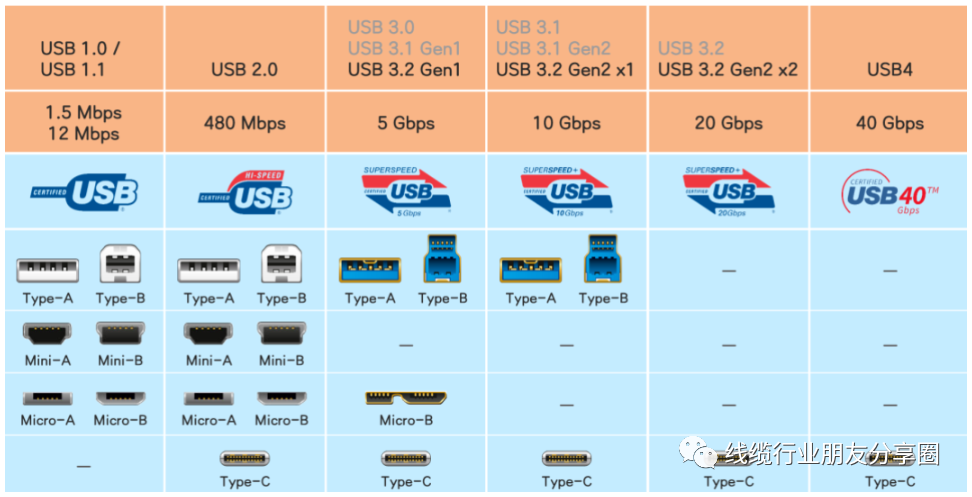
Among them, the latest USB4 standard (such as USB4 Cable, USBC4 To USB C) currently only supports Type-C interfaces. Meanwhile, USB4 is compatible with multiple interfaces/protocols including Thunderbolt 3 (40Gbps Data), USB, Display Port, and PCIe. Its features of supporting 5A 100W USB C Cable power supply and USB C 10Gbps (or USB 3.1 Gen 2) data transmission lay the foundation for large-scale popularization.
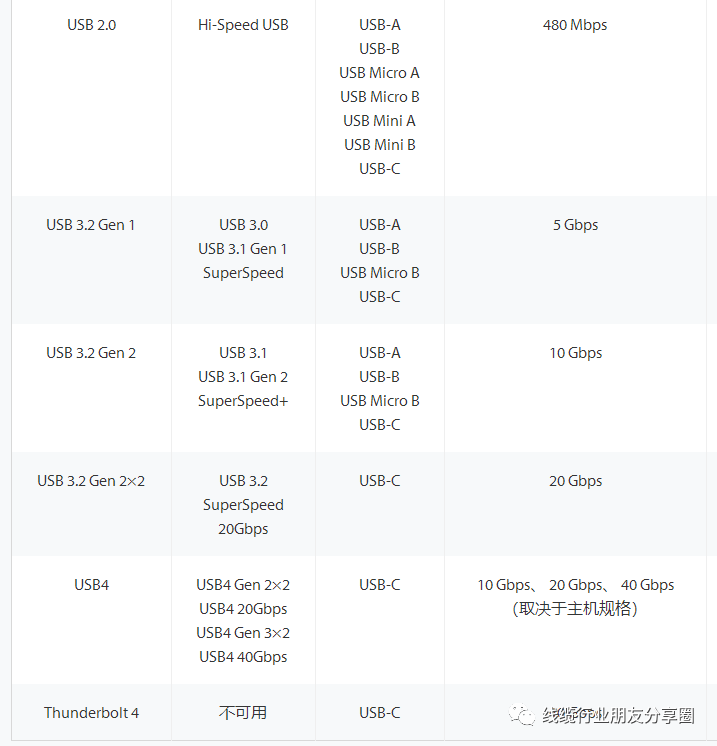
Overview of Type-A/Type-B, Mini-A/Mini-B, and Micro-A/Micro-B
1) Electrical Characteristics of Type-A and Type-B
The pinout includes VBUS (5V), D-, D+, and GND. Due to the use of differential signal transmission, the contact design of USB 3.0 A Male and USB 3.1 Type A prioritizes the connection of power (VBUS/GND are longer), followed by the data lines (D-/D+ are shorter).
2) Electrical Characteristics of Mini-A/Mini-B and Micro-A/Micro-B
Mini USB and Micro USB (such as USB3.1 Micro B TO A) have five contacts: VCC (5V), D-, D+, ID, and GND. Compared to USB 2.0, an additional ID line is added to support USB OTG functionality.
3) USB OTG Interface (Can Act as HOST or DEVICE)
USB is divided into HOST (host) and DEVICE (or slave). Some devices may need to act as HOST at times and as DEVICE at other times. Having two USB ports can achieve this, but it is a waste of resources. If a single USB port can act as both HOST and DEVICE, it would be much more convenient. Thus, USB OTG was developed.
Now the question arises: How does a USB OTG interface know whether it should work as HOST or DEVICE? The ID detection line is used for OTG functionality (the high or low level of the ID line indicates whether the USB port is working in HOST or DEVICE mode).
ID = 1: The OTG device works in slave mode.
ID = 0: The OTG device works in host mode.
Generally, the USB controllers integrated in chips support OTG functionality and provide a USB OTG interface (connected to the USB controller) for Mini USB or Micro USB and other interfaces with an ID line to be inserted and used.
If there is only one Mini USB interface (or Micro USB interface), and if you want to use the OTG host mode, then you will need an OTG cable. For example, the OTG cable for Mini USB is shown below in the figure: As you can see, the Mini USB OTG cable has one end as a USB A socket and the other end as a Mini USB plug. Insert the Mini USB plug into the Mini USB OTG interface of the machine, and the connected USB device should be plugged into the USB A socket on the other end. For example, a USB flash drive. The USB OTG cable will lower the ID line, so the machine knows that it should act as a host to connect to the external slave device (such as a USB flash drive).
Post time: Aug-13-2025


