
USB 3.2 Basics (Part 1)
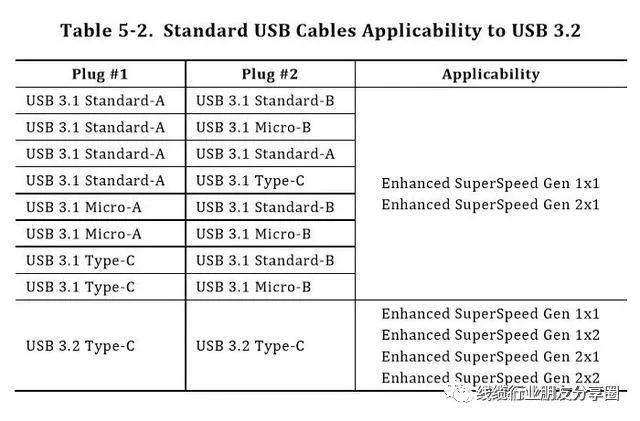
According to the latest USB naming convention from USB-IF, the original USB 3.0 and USB 3.1 will no longer be used. All USB 3.0 standards will be referred to as USB 3.2. The USB 3.2 standard incorporates all the old USB 3.0/3.1 interfaces. The USB 3.1 interface is now called USB 3.2 Gen 2, while the original USB 3.0 interface is called USB 3.2 Gen 1. Considering compatibility, the transfer speed of USB 3.2 Gen 1 is 5Gbps, USB 3.2 Gen 2 is 10Gbps, and USB 3.2 Gen 2×2 is 20Gbps. Therefore, the new definition of USB 3.1 Gen 1 and USB 3.0 can be understood as the same thing, just with different names. Gen 1 and Gen 2 refer to different encoding methods and bandwidth utilization rates, while Gen 1 and Gen 1×2 are intuitively different in terms of channels. Currently, many high-end motherboards have USB 3.2 Gen 2×2 interfaces, some of which are Type-C interfaces and some are USB interfaces. Currently, Type-C interfaces are more common.The differences between Gen1, Gen2 and Gen3
1. Transmission bandwidth: The maximum bandwidth of USB 3.2 is 20 Gbps, while that of USB 4 is 40 Gbps.
2. Transmission protocol: USB 3.2 mainly transmits data through the USB protocol, or configures USB and DP through the DP Alt Mode (alternative mode). While USB 4 encapsulates the USB 3.2, DP and PCIe protocols into data packets using the tunnel technology and sends them simultaneously.
3. DP transmission: Both can support DP 1.4. USB 3.2 configures the output through the DP Alt Mode (alternative mode); while USB 4 not only can configure the output through the DP Alt Mode (alternative mode), but also can extract DP data by extracting the data packets of the USB4 tunnel protocol.
4. PCIe transmission: USB 3.2 does not support PCIe, while USB 4 does. The PCIe data is extracted through the USB4 tunnel protocol data packets.
5. TBT3 transmission: USB 3.2 does not support, but USB 4 does. It is through the USB4 tunnel protocol data packets that PCIe and DP data are extracted.
6. Host to Host: Communication between hosts. USB 3.2 does not support, but USB 4 does. The main reason for this is that USB 4 supports the PCIe protocol to support this function.
Note: Tunneling technology can be regarded as a technique for integrating data from different protocols together, with the type distinguished through the data packet header.
In USB 3.2, the transmission of DisplayPort video and USB 3.2 data occurs through different channel adapters, while in USB 4, DisplayPort video, USB 3.2 data, and PCIe data can be transmitted through the same channel. This is the biggest difference between the two. You can refer to the following diagram to gain a deeper understanding.
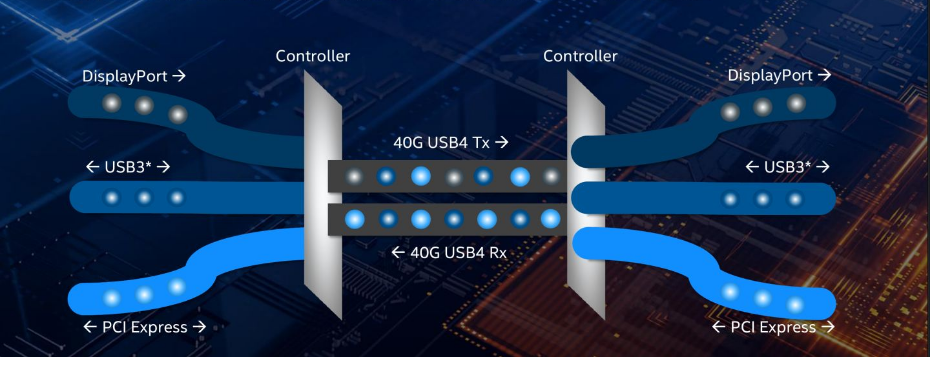
The USB4 channel can be imagined as a lane that allows various types of vehicles to pass through. USB data, DP data, and PCIe data can be regarded as different vehicles. In the same lane, different vehicles are lined up and traveling in an orderly manner. The same USB4 channel transmits different types of data in the same way. USB3.2, DP, and PCIe data first converge together and are sent out through the same channel to the other device, and then the three different types of data are separated out.
Post time: Aug-15-2025


